


Vehicle Care by Assurant
3.034.00 Reviews
App Specs
- Version
- 3.3.1
- Updated On
- License
- Free
- Downloads
- 50,000+
- Developer
- Assurant, Inc.
- Categories
- Auto & Vehicles
- Platform
- Android
Screenshots
 Analysis by AppCompare
Keeping up with a car is less about one big repair than a steady stream of small jobs, records, and deadlines. I find a dedicated vehicle-care app most useful when it makes those details easier to retrieve at the moment I need them, rather than promising to take responsibility for the car itself. Vehicle Care by Assurant is aimed at that practical middle ground: organizing routine ownership tasks in one place. It is a free Auto & Vehicles app from Assurant, Inc., and its overall rating is 3.0 from around 70 ratings, so I’d approach it as a useful organizer to try, not an automatic fit for every driver.
Choose it for the job you actually need done
Before installing any car-care app, I’d decide what is currently slipping through the cracks. If I forget when maintenance is due, lose receipts, or want a clearer picture of fuel spending, a single place for reminders and records can help. If the main problem is diagnosing a warning light, comparing repair estimates, or finding a mechanic I trust, an organizer may not solve it. Those are different jobs, and I would not treat a maintenance tracker as a substitute for a technician or roadside assistance.
Vehicle Care is intended to simplify vehicle ownership, and its described tools make the most sense for a driver who wants to build a basic history over time. The app is free, carries an Everyone age rating, and has passed 50K+ installs. It was released on October 3, 2020, and version 3.2.5 is the current version. It requires Android 10 or later. Those details make it straightforward to assess whether it fits your phone and whether you’re comfortable trying a free app before making it part of your routine.
Set up a useful record, not just another reminder feed
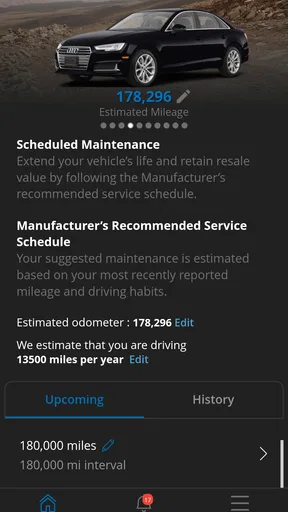
When entering your vehicle details, I’d take a moment to check the make, model, and mileage rather than rushing through setup. Mileage is particularly useful as a reference point for service planning, but only if it stays reasonably current. A quick update when you refuel or have work done can keep your records more meaningful than entering everything months later from memory. I’d also keep any service receipt or paperwork until I’ve confirmed that the information I care about is recorded correctly.
One practical habit is to enter completed maintenance soon after the visit, while the date, mileage, and work performed are fresh. That creates a more useful history for a future service conversation and can help when deciding whether a suggested job is already covered by recent work. The app can help keep that history organized, but I would still save original invoices and warranty documents separately when they matter. A phone record is convenient; it should not be the only copy of paperwork that could be important during a repair or sale.
Getting Started with Vehicle Care
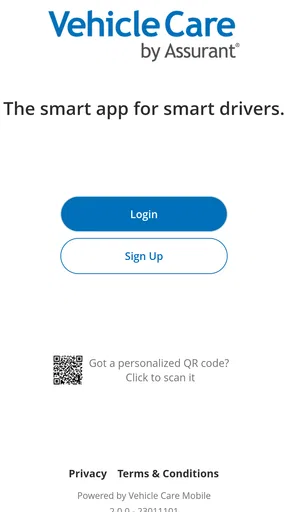
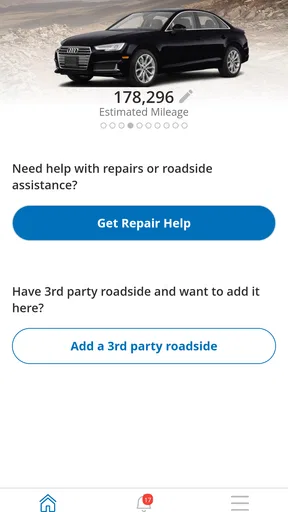
First things first, let’s talk about setting up Vehicle Care. The app is available on both Android and iOS, and the download process is as straightforward as it gets. Once you've got it installed, you're greeted with a clean and user-friendly interface that’s super easy to navigate.
The app begins by asking for some basic details about your vehicle. You’ll input info like your car’s make, model, and mileage. It feels a bit like getting to know a new friend, and trust me, the app uses this info to tailor its features to your specific needs. It's like having a personal car assistant right in your pocket!
Worth Reading Before You Choose

EA SPORTS FC Mobile 26 Is a Bigger Football Game, but It Takes Time

Flipboard Shows What News Apps Must Do Beyond the Feed

Switching to Android Auto Means Rethinking Your Driving Routine

Google Calendar Makes a Crowded Week Easier to Manage

Ludo King Makes the Most of the Minutes Between Plans

Baby Panda World Brings Quick Play to Modern Phones, but Its Game Library Feels Busy
Features That Keep You in the Driver’s Seat
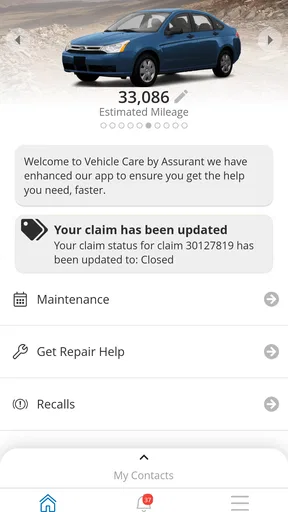
Now, let’s dive into what makes this app stand out. One of its coolest features is the maintenance schedule tracker. It’s like having a calendar that knows exactly when your car needs a little TLC. Oil changes, tire rotations, brake checks—you name it, the app will remind you.
Another fantastic feature is the expense tracker. Keeping tabs on how much you’re spending on your car can be a game-changer, especially if you’re trying to budget better. The app provides a neat breakdown of your expenses, making it easy to see where your money is going. It's like having a financial advisor for your car.
And let’s not forget about the alerts. The app sends timely notifications for upcoming services, recalls, and even when your registration is due. No more last-minute scrambles or missed deadlines. These alerts are lifesavers, trust me.
Turn reminders into an everyday workflow
Reminders are only helpful if they lead to an action, so I’d use them as prompts to check the car’s records and plan a visit, not as proof that a particular repair is urgently required. For example, a service alert can be a good nudge to look at the owner’s manual or call a shop, especially if the vehicle has unusual driving conditions or a maintenance history that differs from a standard schedule. The app’s convenience is in keeping the prompt visible; the final decision still belongs to the driver and, when needed, a qualified mechanic.
A realistic use case is a weekday commute followed by a weekend road trip. I might notice a reminder while planning the trip, check the mileage and recent service notes, then decide whether to book a routine inspection before leaving. Afterward, I can record fuel purchases and any maintenance, so the next check-in is based on a trail of entries rather than a vague recollection. That modest routine is more valuable than trying to reconstruct a year of car expenses in one sitting.
For fuel tracking, consistency matters more than perfect precision. I’d use the same approach each time—recording fill-ups in a similar way—so comparisons over time are less confusing. A single entry may not tell me much, particularly if the journey mix changes, but a steady set of records can make trends easier to notice. It is best treated as personal tracking, not a promise that the app can explain every change in fuel economy.
Stay Connected with Your Vehicle
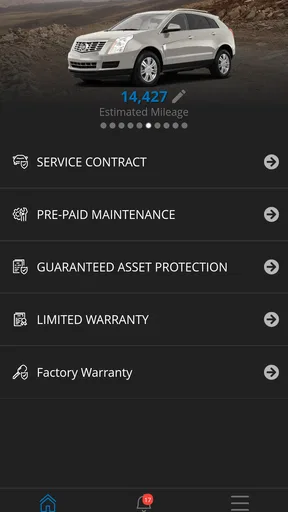
One thing I truly appreciate about the app is how it keeps you connected with your car. You can log fuel fill-ups, track your fuel efficiency, and even store important documents like insurance and registration right in the app. It’s like having a digital glove box.
The app also offers a directory of nearby service centers, which is perfect if you’re traveling or just need a new place to take your car. You can even book appointments directly through the app. It really couldn’t be easier.
Know when a different kind of app is better
Compared with a paper logbook, an app is easier to search and can keep reminders alongside records, but paper has the advantage of being available without opening a phone. Compared with a general calendar and notes app, a vehicle-focused tool keeps information related to the car together instead of scattered across appointments, photos, and expense notes. If you already have a reliable system that you maintain, switching may add work rather than remove it.
There are also cases where I’d choose another category of tool. A repair-shop platform is a better starting point when the priority is finding and evaluating a specific local mechanic. A diagnostic tool is more suitable when I need help interpreting vehicle trouble, while a manufacturer’s own service resources may be preferable for model-specific guidance. Vehicle Care’s strength is the ownership record and reminder workflow, not replacing those specialized options.
The service-center directory and appointment booking can be convenient when I’m away from my usual garage, but I’d still compare the available options and confirm the details directly before relying on an appointment. A directory can shorten the search; it cannot tell me whether a shop is right for a particular repair or whether the booking suits my schedule. I see that as a useful starting point rather than a reason to stop asking questions.
Keep the habit manageable
The main trade-off with any tracker is the effort of maintaining it. If I only enter data occasionally, the expense picture and maintenance history can become incomplete, and a reminder may be based on outdated mileage. I’d start with the entries I’m most likely to keep up with—perhaps service visits and fuel—and add other details only when they genuinely help. A small, consistent record is more useful than an elaborate setup abandoned after a week.
It is also worth deciding what information belongs in a convenient digital glove box and what should remain in a secure, separate place. Keeping documents handy can save time when needed, but I would not assume that storing a file in an app removes the need to retain originals or follow the document issuer’s requirements. Before depending on any stored item, I’d check that I can retrieve the right version quickly and keep a backup for anything important.
If you share a car with someone else, agree on who will update mileage, record fuel, and mark maintenance as completed. Without that simple division, two drivers can create gaps or duplicate entries, which weakens the usefulness of the history. For a household with multiple vehicles, I’d also make each record easy to distinguish so that a reminder or expense is not accidentally attributed to the wrong car.
Switching without losing your history
Moving from a spreadsheet, notebook, or another app has a real but manageable cost: older records may need to be entered by hand, and not every detail is worth transferring. I’d bring over the information that affects decisions now, such as recent service work, current mileage, and upcoming deadlines, then keep older receipts archived separately. This avoids turning setup into a large data-entry project before the app has had a chance to prove useful.
If you’re switching from a calendar, keep any existing appointments visible until you’ve confirmed that the new reminder routine is working for you. I would not delete the old system immediately or assume that importing a vehicle profile also carries over a full service history. The safest approach is to run both methods briefly, compare what each reminds you about, and then retire the extra process only when the records are dependable.
My Personal Take
After using Vehicle Care for a few months, I can honestly say it’s become an essential tool in my daily life. The peace of mind it provides is invaluable. I no longer have to worry about missing a maintenance appointment or losing track of my car expenses. The app does all the heavy lifting for me.
While there’s always room for improvement, like adding more customization options or integrating with smart car systems, the app as it stands is robust and reliable. It’s perfect for anyone looking to simplify their car maintenance routine.
In conclusion, if you’re looking for an app to help you take better care of your vehicle, Vehicle Care by Assurant is definitely worth checking out. It’s like having a mechanic, accountant, and personal assistant all rolled into one handy app. So go ahead, give it a try, and let it steer you towards hassle-free car care!
Who I’d recommend it to
I’d recommend trying it if you own a car, prefer keeping maintenance and spending notes in one place, and are willing to update the record as you go. It is especially appealing to someone who has recently bought a used vehicle and wants to establish a clear record from this point forward, or to a driver juggling routine errands who needs a nudge to plan service before a deadline becomes stressful.
I’d be more cautious if you want an app to automatically diagnose mechanical problems, guarantee the accuracy of every maintenance interval, or manage every part of vehicle ownership without your input. I’d also skip it if a simple calendar already works perfectly for you or if you rarely use a smartphone for personal records. The best car-care system is the one you will actually maintain, and this one still depends on you entering useful information.
My recommendation is to give it a focused trial: add one vehicle, record the current mileage, and enter the next known service or expense rather than trying to build a complete history on day one. If the reminders and records make your next ownership task easier, keep using it. If you find yourself duplicating notes or ignoring alerts, a calendar, notebook, or more specialized service tool may fit your habits better. For everyday organization, though, it offers a practical place to start.
Pros
- User-friendly interface for easy navigation.
- Comprehensive diagnostic tools included.
- Customizable maintenance reminders.
- Wide range of supported vehicle models.
- Real-time updates on vehicle status.
Cons
- Limited offline functionality.
- Subscription required for premium features.
- Occasional syncing issues reported.
- In-app ads can be intrusive.
- Lacks integration with some GPS systems.
FAQs for Vehicle Care by Assurant
What features does Vehicle Care by Assurant offer?
Vehicle Care by Assurant provides a comprehensive suite of features designed to keep your vehicle in top condition. It offers maintenance reminders, service history tracking, and roadside assistance. Additionally, it provides diagnostic alerts and repair estimates, making it easier for you to manage vehicle maintenance efficiently.
Is Vehicle Care by Assurant compatible with all car models?
Vehicle Care by Assurant is designed to be compatible with a wide range of car models. However, it is essential to check the app's compatibility with your specific vehicle make and model. The app frequently updates to include newer models, ensuring broad coverage across different manufacturers.
How does Vehicle Care by Assurant ensure data security?
Vehicle Care by Assurant takes data security seriously by implementing advanced encryption and security protocols. Your personal and vehicle information is safeguarded, ensuring privacy and protection from unauthorized access. The app adheres to industry standards to provide users with peace of mind regarding their data security.
Does Vehicle Care by Assurant require a subscription?
Vehicle Care by Assurant offers both free and premium subscription plans. The free version provides basic features, while the premium subscription unlocks advanced functionalities such as in-depth diagnostic tools and priority customer support. Users can choose the plan that best suits their needs and budget.
How user-friendly is the Vehicle Care by Assurant app?
The Vehicle Care by Assurant app is designed with user-friendliness in mind, featuring an intuitive interface that is easy to navigate. It provides clear instructions and helpful tips, making it accessible even for users who are not tech-savvy. The app aims to simplify vehicle maintenance for everyone.


